JackGriffin wrote:There ought to be a "How do I do this" section of the forum where these good tutorials are grouped without a discussion. Something like an online reference section.
Guess why I started "Your Unreal"

Any chat is confined to the comments boxes, or a separate thread (such as here).
JackGriffin wrote:We badly need someone to host the Uncodex source code stuff too if someone has a couple MB of extra room on their site. I have it packaged and ready, you just have to upload it. As far as I know no one aside from UT-Files now hosts an online version that is public, and Skillz site is almost useless because of the massive top frame occluding so much of the reference pages.
I did try and drag the Uncodex through the Web Archive, but it involved opening (or requesting) every page manually.
http://wayback.archive.org/web/*/http:/ ... ncodex-ut/
(Any site with an "Alexa" account is automatically archived)
My.Opera let you embed html into the space allotted (with a few restrictions).
Or it can just be referenced as a link to the index, so a whole new page is open.
I can try it from my account, or you can grab an account and use your own free 2 GB. Then as a member of the group I can make you an admin, so you can "tweak" as necessary.
Remember people, that the "My Opera" community site is one of the least blocked by paranoid countries, so that's why I give it a big

Back to topic.
I use Winamp for day-to-day use and normal conversion of files I know are good quality (but usually for the LAME profiles).
Audacity is used as the example because of several reasons.
1. It is completely free.
2. It is Multi-OS.
3. Most importantly you can Normalize/fix the audio before export.
4. It will do the
whole convert and export to 22k 8bit mono, in a few simple steps. (Winamp cannot convert the whole process down to 8-bit mono, with the same quality control Audacity (or similar program) can give you.
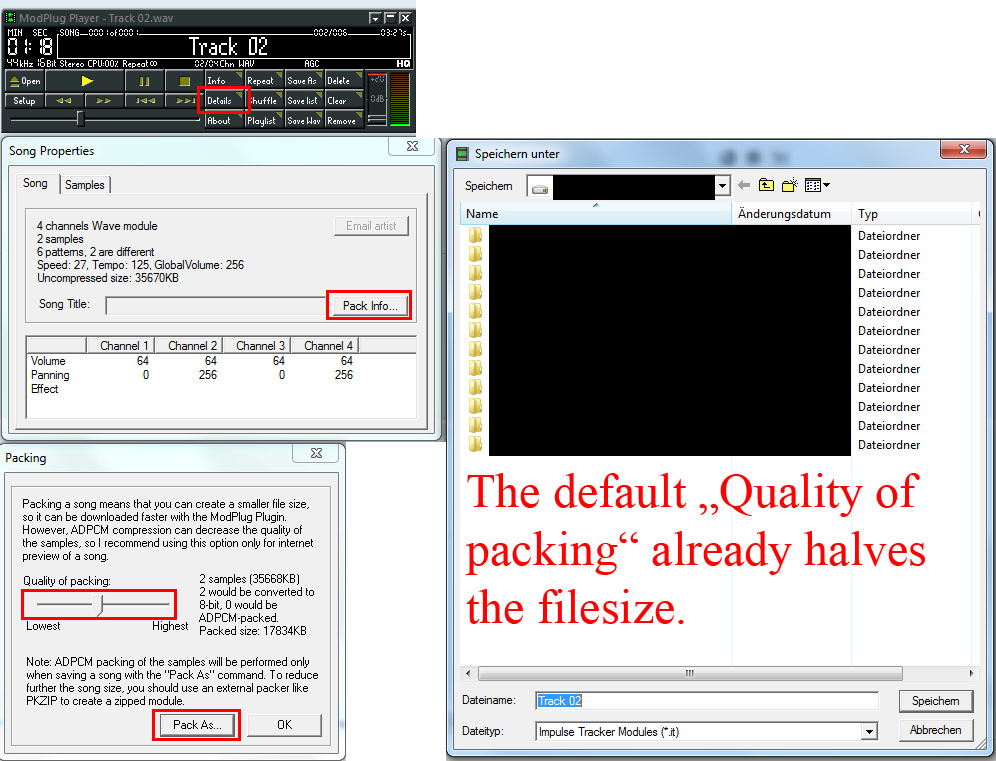
I used to use ModPlug Player for converting to 8bit, but you still need to import into the full MPT afterwards. (this seemed stupid, so I investigated).
The full "Open MPT" can do everything you need with the WAV file, if you already have it as an 8bit 22k mono file (However you get it to that quality first is up to you).
The only reason to use the old ModPlug Player, is if you want to use the WAV compression.
I would only advise this, if the audio is very clean and clear. It has already suffered being reduced to 8bit 22k.
My aim here is to encourage higher quality audio files that do not distort.
Simple atmospheric music will suffer less than your favourite bangin' dance-floor filler. Messy/noisy metal tracks also suffer badly, so are best avoided.
The whole process is needless if people have a good tracker-mod collection.
I may put the track I made online with the original so people can hear the quality difference, in a streaming player or something.